New Feature: Participant Approval Workflows

Review. Approve. Collect Payment.

A simple workflow that gives organizers more control over who participates in their programs and events.

Collect Applications

Let applicants apply now while keeping final approval in your hands.

Review Applicants

Choose who participates and maintain the quality of your program.

Send Payment Links + Approvals

Only approved applicants pay, creating a smoother experience for everyone.

Track Payments

See who has paid, who hasn’t, and keep every record in one place.

How it Works

Step 1

Activate the Setting

Turn on Participant Approval Workflows in the settings of any new Registration, Sponsorship, or Memorial campaign.

From that point on, payment waits until you give the green light.

Step 2

Applicants Apply for Your Review

Participants fill out the same custom forms you already use, no changes there.

Once submitted, they immediately get an email letting them know their application is under review.

Step 3

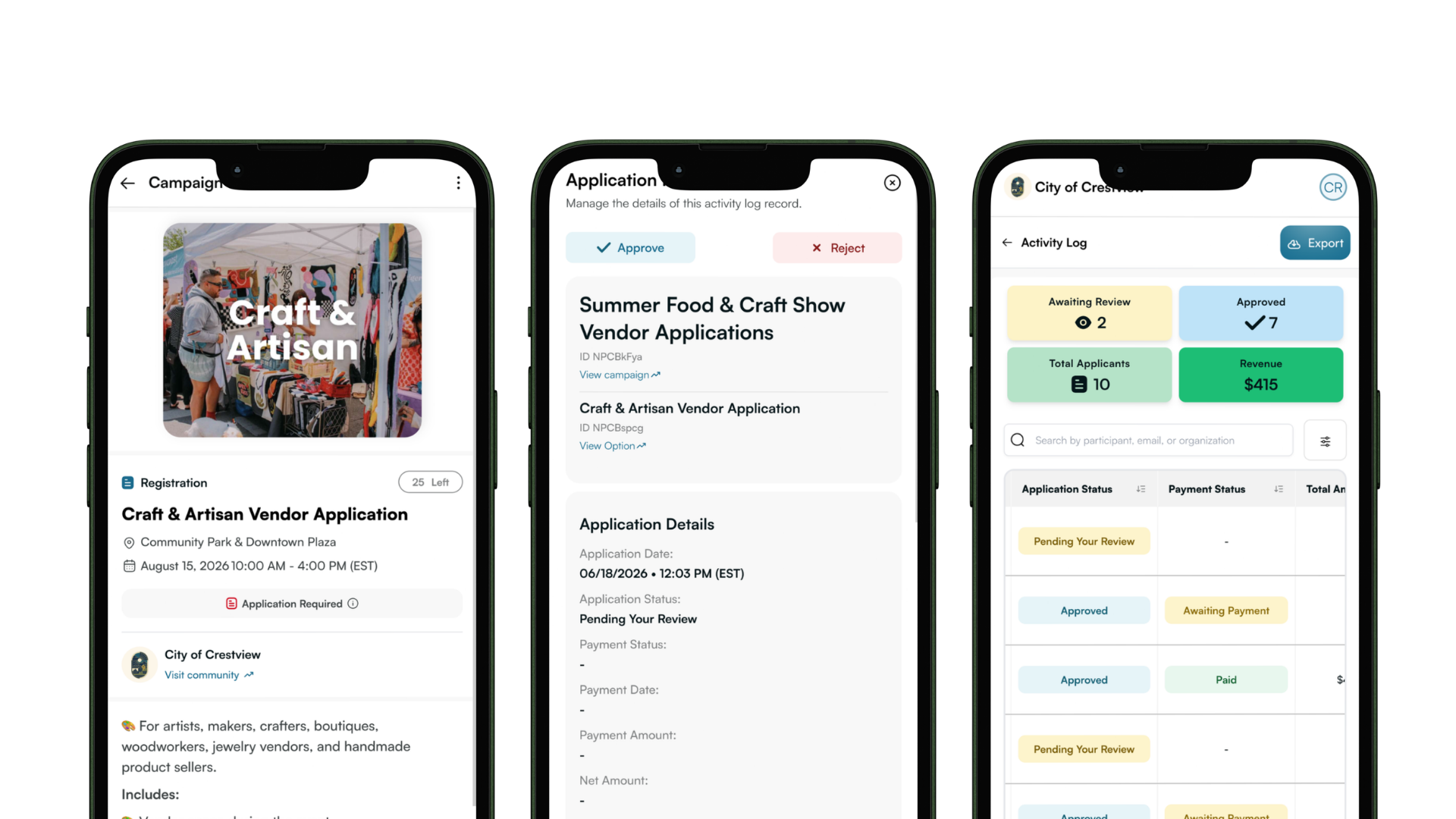
Review, Approve, or Reject

Every submission lands in your Pending Applications queue.

Reject the ones that aren't a fit, or approve the ones you want and set the amount to charge, including any add ons.

Step 4

Approvals Sent with Payment Links

Approved participants receive an email with your custom message and a payment link to finish their registration, sponsorship, or dedication.

We send automatic reminders too, so nothing slips through the cracks before your event.

Step 5

Track Every Payment

See exactly who has paid, who is still outstanding, and access every payment link right in your Activity Log.

You can also record cash or check payments, so your records stay complete.

Available for These Campaign Types

Perfect for programs where participation requires review and approval before payment.

Best used for:

✔️ Farmers Market Registration
✔️ Festival Vendor Registration
✔️ Parade Sign-Ups

Best used for:

✔️ Event Sponsorships
✔️ Banner Sponsorships
✔️ Program Sponsorships

Best used for:

✔️ Memorial Bench Programs
✔️ Veterans Banner Programs
✔️ Tree Dedication Applications

Turn your next campaign into an elegant two-part approval process!

Contact Support Login to Profile

Participant Approval Process FAQs

What campaign types will this work on?

Participant Approval Workflows are currently available for Registration, Sponsorship, and Memorial campaigns. They are ideal for programs where applications need to be reviewed and approved before payment is collected.

Does this work for free registrations, where payment is not collected?

Yes. You can use Participant Approval Workflows for free events, programs, and applications that require organizer review before participation.

If applicants do not need approval, we recommend using a standard registration process instead.

What does the approval and rejection email participants get look like?

When you approve an applicant, they receive a custom email message along with a secure payment link to complete their registration, sponsorship, or dedication.

When you reject an applicant, they receive your custom rejection message explaining next steps or thanking them for their interest.

Both emails can be personalized to match your program and communication style.

See example of emails -> (help juice)

Can I customize the approval and rejection emails?

Yes. Include your own message when approving or rejecting applicants so participants receive clear next steps and event-specific information.

Can approved applicants be charged different amounts?

Yes. During the approval process, you can adjust the amount due, including optional add-ons, sponsorship upgrades, utilities, booth fees, or other custom charges.

Will applicants receive payment reminders?

Yes. Approved applicants automatically receive reminder emails, helping reduce manual follow-up.

Can I see who has and hasn’t paid?

Yes. The Activity Log makes it easy to track approved applicants, completed payments, outstanding balances, and payment statuses in one place.

Do applicants create an account to apply?

No. Participants simply complete your application form online. No account creation is required.

Can I approve applicants after applications have already been submitted?

Yes. Applications remain in your Pending Applications queue until you approve or reject them.

What happens if an applicant never pays?

Their application remains unpaid. Organizers can easily identify outstanding payments and follow up if needed.

Can I turn this feature on or off at any time?

No. Once Participant Approval Process are enabled on a campaign, they cannot be disabled. This helps ensure a consistent application and payment experience for all participants.